Hospitality & Tourism Management • AI Applications
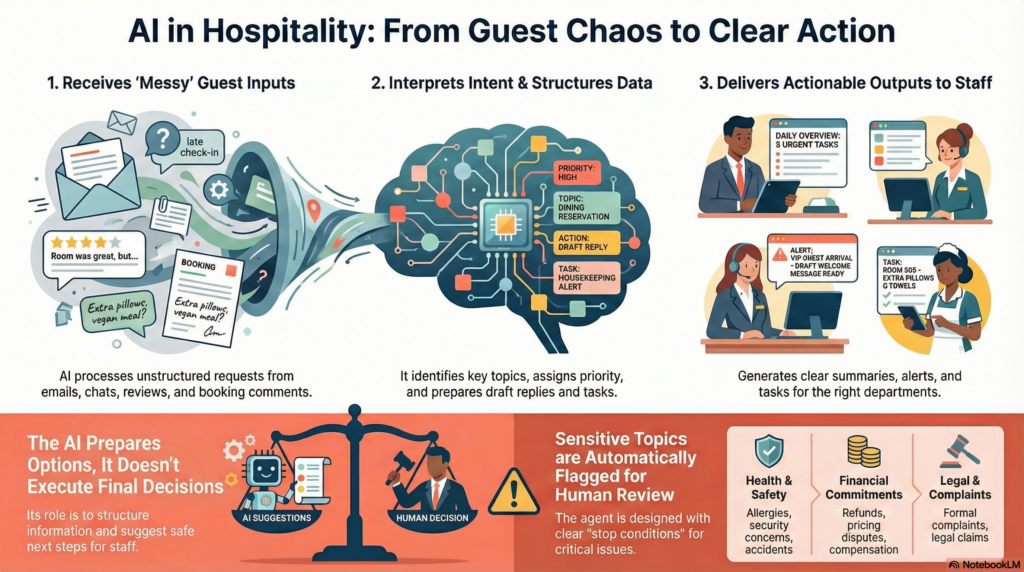
An AI agent is not just a chatbot, and it is not just automation. It is a system designed to interpret real-world situations, rely on your internal knowledge (procedures, policies, checklists), and prepare concrete operational actions in your tools (email, PMS, CRM, task managers), while keeping human control over sensitive decisions.
What is an AI Agent in practice?
In everyday hospitality operations, information arrives in unstructured form: guest emails, WhatsApp messages, reviews, internal notes, booking comments. An AI agent is designed to transform these raw signals into structured, actionable outputs: summaries, categories, proposed replies, tasks, or alerts to the right department.
For example, if a guest writes: “We will arrive late, one of us has allergies, and can we get a quiet room?”, the agent can extract each topic, prioritize them, prepare a draft reply, and create the appropriate tasks for reception and housekeeping.
What an agent typically produces
A short summary, tags (topic/theme), priority, suggested owner/department, a draft reply, and a clear escalation flag when needed.
What it should not do by default
Commit to refunds, pricing, legal claims, safety decisions, or health-related instructions. For these cases, the agent prepares and escalates.
Traditional automation vs generative AI: the real difference
Traditional automation relies on conditional logic (“if A, then B”). It performs extremely well when the world is predictable: confirmations, data transfers, record creation, and routine notifications.
In hospitality, however, many requests arrive as mixed, incomplete, or ambiguous messages. When the input is messy, a purely rule-based approach tends to grow into a long list of exceptions, making workflows harder to maintain and less reliable.
Generative AI adds a missing layer: it can interpret intent, summarize, classify, and draft context-aware text. It does not replace rules; it connects human language to structured systems, so that rules can be applied on well-formed outputs.
Practical takeaway: use automation for predictable steps; use generative AI to convert messy inputs into structured decisions that a workflow can route safely.
Why AI agents matter in hospitality
AI agents are useful in hospitality because the sector relies heavily on human language, coordination, and reactivity. They reduce operational friction while preserving service quality and managerial control.
- Less time spent reading, sorting, and drafting.
- More consistent guest communication and internal handovers.
- Managers focus on decisions instead of raw information processing.
- Scales operations without dehumanizing the guest experience.
The golden rule: the AI prepares, humans decide
In hospitality, some decisions must remain under human responsibility: pricing, refunds, complaints, safety issues, and health-related topics. A well-designed AI agent does not execute irreversible or sensitive actions without explicit human validation.
Its role is to prepare information, structure options, and suggest safe next steps — not to replace managerial judgment.
From concepts to practice
The exercises below use two Excel datasets to simulate real operational inputs: guest messages, reviews, and internal incident logs. Your goal is to produce the kind of structured outputs that teams can actually use (draft replies, routing, trend synthesis, escalation policy).
Hospitality & Tourism Management • Applied AI (Exercises)
Practical Exercises
Download the datasets once, then use them across Exercises 1–4.
File 1 — Guest Inquiry Classification & Draft Reply
25 realistic guest messages (email, WhatsApp, chat, OTA), with metadata. Fill only columns starting with student_. Includes an Instructions tab.
⬇️ Download File 1 (.xlsx)student_category,
student_priority,
student_department,
student_draft_reply,
student_escalation_needed,
student_notes.
File 2 — Guest Sentiment & Quality Trend Synthesis
One workbook including: Guest_Reviews (40 multi-source reviews), Incident_Logs (35 internal incidents), plus Theme_Taxonomy for consistent coding.
⬇️ Download File 2 (.xlsx)Guest_Reviews,
Incident_Logs,
Theme_Taxonomy.
Exercise 1 — Guest Inquiry Classification & Draft Reply
Uses File 1Open Guest_Inquiry_Classification_DraftReply.xlsx. You receive mixed guest messages (email, WhatsApp, chat, OTA). Each message may contain reservations, late check-out requests, dietary restrictions, billing questions, complaints, or safety concerns. Design an agent workflow that produces structured outputs without taking irreversible decisions.
In the Excel file
Fill only the columns starting with student_. For each message: category, priority, department, a safe draft reply, and whether escalation is needed (Y/N).
Non-negotiable rule
If the request touches health/allergens, safety/security, refunds, or legal disputes, the agent must flag it for human validation. Draft replies remain factual and avoid commitments.
Deliverables
- A workflow diagram (Input → Classification → Draft/Task → Escalation).
- Five strong draft replies (from the dataset) with a short rationale.
- An escalation policy: what triggers “human validation required”.
Exercise 2 — Operational Routing & Task Creation
Based on Exercise 1, design a safe workflow that routes tasks to the right department (Front Desk, Housekeeping, F&B, Maintenance, Sales/Events). The agent produces task descriptors and alerts, but does not execute irreversible actions.
Focus points
- Priority thresholds (e.g., P1 < 2h, P2 same day, P3 within 48h).
- Task metadata (category, channel, due date, owner, notes).
- Clear stop conditions for escalation (billing disputes, safety, allergies, legal).
Deliverables
- A routing workflow diagram.
- Five example tasks written in a “ready-to-use” format (Title, Owner, Due date, Notes).
Exercise 3 — Guest Sentiment & Quality Trend Synthesis
Uses File 2Open Guest_Sentiment_Quality_Trends_Dataset.xlsx. You are given a batch of guest reviews and incident logs. Design an agent that turns these raw inputs into a management-ready synthesis: recurring issues, severity, likely causes, and testable improvements.
Step A — Code the reviews
In Guest_Reviews, fill the student columns (sentiment, theme, severity, action suggestion). Use Theme_Taxonomy to normalize the coding.
Step B — Link to incidents
In Incident_Logs, code the theme, propose a root-cause hypothesis, and recommend a small test (pilot, checklist, staffing tweak, signage, SOP adjustment).
Deliverables
- A 1-page synthesis: top 5 recurring issues, severity, evidence (reviews + incidents).
- 5–10 improvement hypotheses written as testable statements.
- A short action plan expressed as tests (what to try, where, how to measure).
Exercise 4 — Safety & Escalation Policy Design
Define clear “stop conditions” for your agents. The policy must specify when the agent should avoid commitments and escalate to a human operator. The goal is operational realism: you protect guests, staff, and the business.
Deliverables
- A table of sensitive scenarios (health/allergies, safety/security, billing disputes, refunds, legal claims) + trigger.
- Two example prompts showing how the agent communicates uncertainty (“I cannot confirm; here is what we should verify”).
Guidance Notes
Treat this as an implementation sprint: focus on outputs that are reversible (draft replies, tickets, checklists, alerts). An agent becomes valuable when it reduces cognitive load by turning messy input into structured decisions-in-progress, with explicit escalation.
Practical tip: If your workflow cannot explain “why it escalates” and “what a human must validate”, it is not ready for real operations.
References (English)
- SiteMinder – AI in the hospitality industry Link
- TrustYou – How AI agents work in hospitality Link
- VirtualWorkforce – AI Agents for Hospitality Link